 FREE SHIPPING – AUSTRALIA WIDE




A flickering neon sign is almost always a power or connection problem: a failing driver or transformer, loose wiring, or voltage drop on a long run. If you notice a burning smell, repeated flash-and-shutdown cycles, or visible sparking, switch the sign off at the wall immediately and call a qualified electrician before doing anything else.
TL;DR:
- After switching off power, inspect plugs, connectors, corrosion, and terminal screws; if flicker returns within days after reseating, arrange a proper repair.
- Far end dimming or pinking on a long run points to voltage drop; a dark isolated section instead suggests a failed tube or LED module.
- LED signs often flicker from an overloaded or failing driver, while flickering only after adding a dimmer usually signals incompatibility; confirm ratings before replacing parts.
- A burning smell, ozone odor, repeated shutdowns, sparks, or damaged insulation requires immediate shutdown and a qualified electrician, especially for high voltage glass neon.
- A technician should test the driver or transformer under load and inspect insulation; cracked glass usually needs rebuilding, while water damage can favor replacement.
Table of Contents
- Common causes of neon sign flicker
- Quick troubleshooting you can try safely at home
- Safety risks and red flags: when to switch off and call help
- When to call a technician and what to expect from repair or replacement
- Maintenance and commissioning tips to reduce flicker recurrence
- Author perspective and Oz Neon proof points
- Effects of humidity and temperature on neon flicker
- Differences between traditional neon and LED neon flicker causes
- Common LED driver types and compatibility issues
- What troubleshooting advice gets wrong
- How we can help with diagnosis, repair and replacement
- FAQ
- Sources
Common causes of neon sign flicker
Most flicker traces back to one of a handful of faults, and the symptoms usually point to the culprit before you open anything up.
A failing or overloaded LED driver tends to cause intermittent flicker that gets worse as the driver warms up, since heat makes a struggling driver less stable. Older glass neon runs on a high-voltage transformer, and a transformer nearing the end of its life can arc internally, which shows up as flicker before it fails outright. Loose, corroded or damaged wiring and connectors are among the most common and most fixable causes, especially where a sign has been handled, moved, or exposed to the weather.
Long LED or neon-flex runs can suffer from voltage drop, where the far end of the sign dims or shifts colour (often turning pink on a white design) while the end near the power source looks fine, a pattern explained by how voltage drop causes pinking along a feeder run. Physically damaged tubes or failed LED modules produce a different pattern: a dead or dark section rather than a dimming gradient, which helps distinguish a hardware fault from a power issue. Incompatible dimmers are another frequent cause, since a driver can run perfectly at full power but flicker as soon as it is paired with a dimmer it was not designed to work with.
- Driver or transformer wear shows up as flicker that worsens with heat.
- Loose or corroded connectors are often the cheapest fix available.
- Voltage drop causes dimming or colour shift at the far end of long runs.
- A dark section (rather than a dim one) usually means a damaged tube or module.
Quick troubleshooting you can try safely at home
Before touching anything, switch off the sign and isolate it from power at the wall or plug. Once it is safely de-energised, work through these checks in order.
- Inspect the sign and cabling for obvious water exposure, scorch marks, or a loose plug.
- Reseat every connector you can access, and check for corrosion or green discolouration on the pins.
- Tighten any accessible terminal screws, since vibration and handling loosen them over time.
- If you have a known-good spare driver or transformer and are comfortable working with mains power, test-swap it with the power fully isolated. Otherwise, leave this step to a professional.
- Watch for voltage-drop signs such as far-end dimming or a pink tint on white sections, and avoid running the sign at full brightness if colour shift appears, since that strain can accelerate component failure.
Pro Tip: If reseating a connector fixes the flicker for a day and then it comes back, treat that as a sign the component is failing, not fixed, and plan a proper repair.
A quick reseat or restart can look like a fix when it only masks a connector or driver that is on its way out. If the flicker returns within a few days of power cycling, the underlying part needs replacing rather than another reset.
Safety risks and red flags: when to switch off and call help
Older high-voltage neon transformers carry a real fire risk if they are allowed to fail unchecked. Research on neon transformer arcing shows these units can produce secondary voltages in the thousands of volts and sustain arcs capable of igniting nearby combustible material under certain fault conditions.
Treat any of these as an immediate stop signal:
- A burning or ozone-like smell near the sign or its power supply.
- Repeated cycles of flicker followed by a full shutdown and restart.
- Visible sparks or arcing at the transformer, driver, or wiring.
- Scorched, melted, or discoloured insulation anywhere along the cable run.
A government regulator warns that unapproved or faulty power supplies for LED neon signs can pose an electric shock and fire risk, which is why a suspect supply should be replaced with an approved unit rather than patched.
If you see any red flag, isolate power at the switch or wall, avoid touching the wiring, and call a qualified electrician or neon technician rather than attempting a high-voltage repair yourself.
When to call a technician and what to expect from repair or replacement
Once you have ruled out the simple fixes, a technician’s visit usually follows a predictable pattern. They will load-test the driver or transformer, check insulation integrity, and measure voltage under full load rather than at idle, since many faults only appear once the sign is drawing real current.
- A driver swap, rewiring a loose connection, or resealing a weatherproofing entry point are common, relatively affordable fixes.
- A cracked glass tube or significant gas loss usually means a tube rebuild rather than a patch.
- Extensive water damage or widespread LED module failure often makes full sign replacement more practical than ongoing repair.
- Custom glass tube work can take longer to source and rebuild than a straightforward LED module or driver swap.
Give the technician as much detail as possible before they arrive: whether the sign is LED neon flex or traditional glass neon, when the flicker started, any prior repairs, and whether the sign has been exposed to water or extreme weather. That detail shortens the diagnostic time considerably.
Maintenance and commissioning tips to reduce flicker recurrence
Most flicker problems are preventable with a bit of routine care rather than reactive fixing.
- Inspect the sign and its connections visually every few months, and clean dust from vents and enclosures.
- Keep enclosures and connectors dry, and check weatherproofing seals on outdoor installs after heavy rain.
- Size the driver correctly for the sign’s load, and avoid undersized cabling on long runs.
- Plan for power injection on long LED or neon-flex runs rather than relying on a single feed point.
- Use drivers and dimmers rated as compatible with each other, and avoid unapproved or generic power supplies.
Pro Tip: If you are adding a dimmer to an existing sign, confirm compatibility with the driver first. Flicker during dimming is one of the most common calls we see, and it is almost always a mismatch rather than a faulty sign.
Author perspective and Oz Neon proof points
Brett has seen the same handful of faults repeat across years of custom neon work: a loose connector, an overloaded driver, or a long run that needed power injection and never got it. Flicker rarely means the whole sign is finished.
Our team at Oz Neon brings over a decade of experience building custom LED neon signage, with every design starting from a tailored, free mockup so the finished sign matches what the customer actually imagined. In one typical case, a flickering wall sign turned out to be nothing more than a loose driver connection: a reseal and reseat fixed it in minutes, no replacement needed.
Effects of humidity and temperature on neon flicker
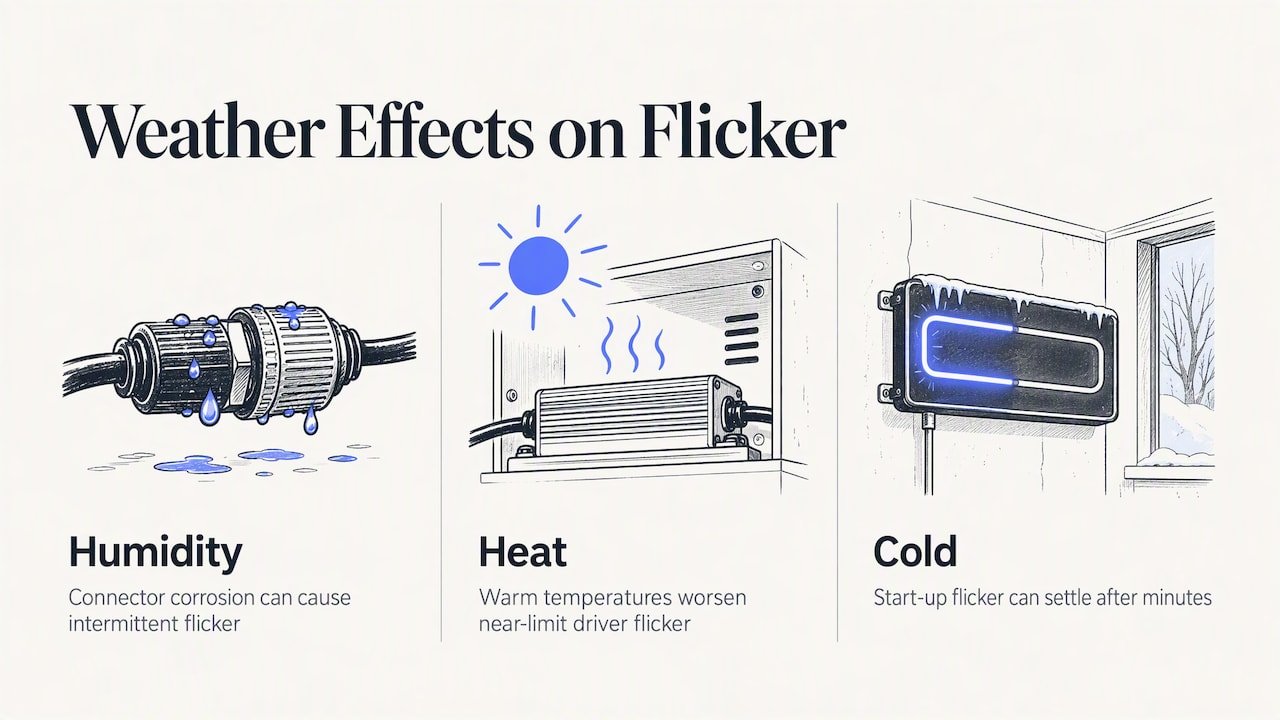
Moisture and heat both stress a neon sign’s electrical components, and outdoor or bathroom-adjacent installations are the most common sufferers. Humidity that reaches connectors or driver enclosures can cause corrosion over time, which raises resistance at the contact point and produces the same intermittent flicker as a loose wire. In coastal or tropical conditions, this can happen even with a sign rated for outdoor use if a seal has degraded.
Heat affects things differently. A driver running at the edge of its rated load will flicker more readily once ambient temperature climbs, because the extra thermal stress pushes an already marginal component closer to failure. This is why a sign that has run flicker-free indoors for months can start acting up during a heatwave, or after being moved to a warmer, less ventilated spot.
Cold has a smaller but real effect too: some LED drivers and glass neon transformers behave less predictably at low temperatures until they warm up, which can show as flicker during start-up that settles after a few minutes. None of this means the sign is faulty, but it does mean the location and ventilation of the power supply matter as much as the sign itself. Keeping enclosures dry, shaded from direct heat where possible, and properly sealed against moisture removes a large share of weather-driven flicker before it starts.
Differences between traditional neon and LED neon flicker causes
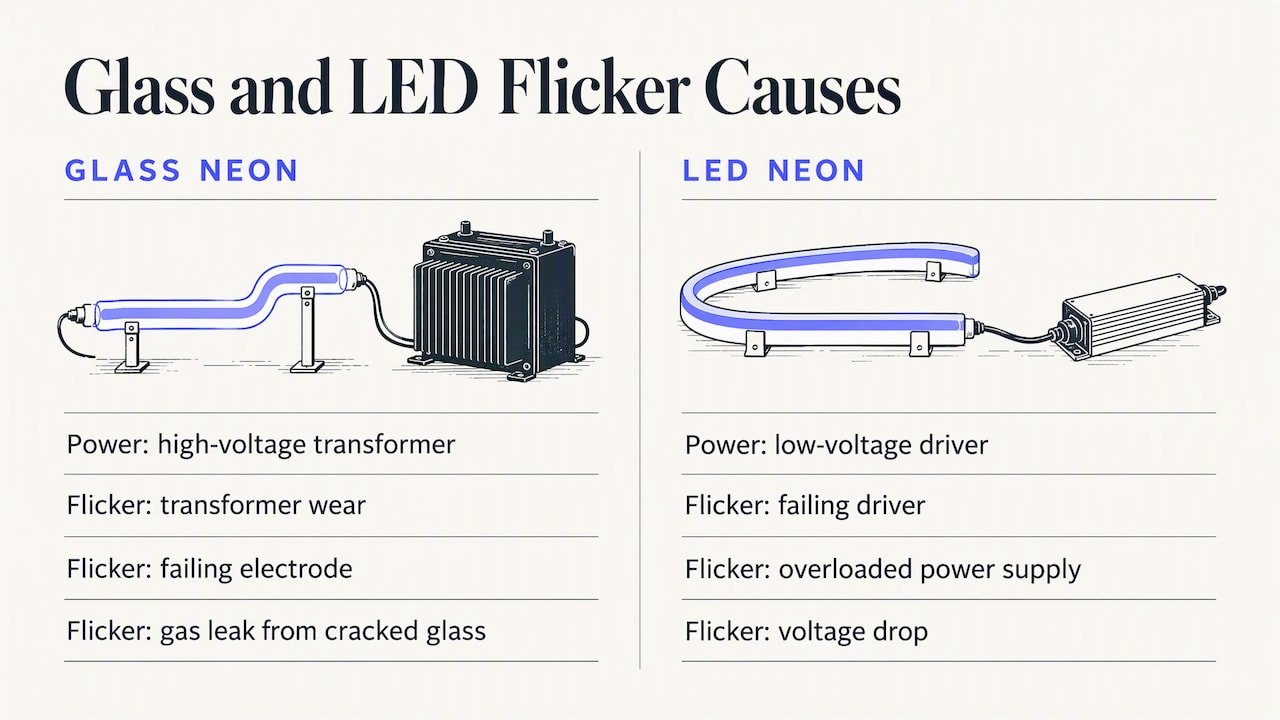
Traditional glass neon and modern LED neon flex fail in different ways, even though both can present as flicker. Glass neon relies on a high-voltage transformer to ionise gas inside the tube, so flicker in these signs usually points to transformer wear, a failing electrode, or gas leaking from a hairline crack in the glass. Because the voltages involved are high, a struggling transformer is also the component most associated with arcing risk.
LED neon flex, by contrast, runs on a low-voltage driver and a string of individual LED modules. Flicker in LED neon signs is most frequently caused by a failing driver, an overloaded power supply, or voltage drop along the run, rather than anything resembling the gas or electrode issues seen in glass neon. A single dead LED segment will usually go dark rather than flicker, while a whole section dimming or flickering together points back to the driver or wiring.
This difference matters for troubleshooting: a flickering glass neon sign deserves more caution because of the voltages involved, while a flickering LED sign is more likely to be a straightforward driver or connection fix you can diagnose with the steps above.
Common LED driver types and compatibility issues
LED neon signs typically run on constant-voltage drivers, most commonly rated at 12V or 24V, though some commercial installs use other voltages depending on the run length and design. Choosing the wrong driver voltage or wattage for a given sign is one of the simplest ways to introduce flicker, since an undersized driver will struggle under load and an oversized one offers no benefit but adds unnecessary cost.
Compatibility problems most often show up when a dimmer or controller is added after the fact. A driver can run a sign perfectly at full brightness and still flicker the moment it is dimmed, because not every dimmer is designed to work with every driver’s dimming protocol. Leading-edge, trailing-edge and PWM dimming systems each expect specific driver behaviour, and mixing an incompatible pair is a common, avoidable cause of flicker.
Over half of reported flicker and dimming issues in LED neon signage trace back to the power supply rather than the LED strip itself, which makes driver selection and dimmer compatibility one of the first things worth checking before assuming the sign itself has failed.
What troubleshooting advice gets wrong
Most troubleshooting guides treat flicker as a single problem with a single fix, usually pointing straight at the driver. That is often right for LED neon, but it skips the more important question for older glass neon: is this safe to keep running at all. The conventional advice to “jiggle the connector and see if it stops” undersells how often a temporary fix masks a transformer or driver that is genuinely failing.
What actually matters is treating LED and glass neon as different risk categories from the start. LED flicker is usually an inconvenience and a cheap fix. Glass neon flicker, especially with any sign of arcing, is a safety question first and a repair question second. Readers should prioritise identifying which type of sign they have, then applying the safe, low-risk checks before deciding whether a reset is a real fix or just a delay.
— Brett
How we can help with diagnosis, repair and replacement
If your sign keeps flickering after the basic checks, we can take it from there. Our team offers diagnostic support and replacement with warranty backing, drawing on experience building custom LED neon signage.

- Upload your design or logo for a free custom mockup if your sign needs a full replacement rather than a repair.
- Browse custom built LED neon signs for businesses if you need commercial-grade signage with professional installation.
- Start a build your own design if you would rather redesign than repair an ageing sign.
Our support team is based locally and can talk you through whether a repair or a fresh custom sign makes more sense for your situation.
FAQ
Is it bad to leave a neon sign on?
LED neon signs are generally designed for extended use and leaving one on is not inherently harmful, though giving any sign occasional rest reduces heat stress on the driver. Older glass neon transformers run hotter and benefit more from being switched off when not needed, particularly if the sign already shows signs of flicker.
How do I stop an LED from flickering?
Start by checking the driver, connectors and dimmer compatibility, since most LED neon flicker traces back to a failing driver, an overloaded supply, or voltage drop rather than the LEDs themselves. Reseating connections and confirming the driver matches the sign’s load and any dimmer in use resolves the issue in most cases.
Why did my neon sign stop working?
A sign that has gone completely dark, rather than flickering, more often points to a fully failed driver or transformer, a cut or disconnected wire, or significant tube or gas loss in glass neon. Unapproved or faulty power supplies have been flagged as a fire and shock risk by product-safety regulators, so a sudden failure is worth having checked rather than bypassed.
What do neon signs mean?
Neon signs are decorative or branded lighting fixtures used for business signage, event decoration, and personal display, with wording or imagery chosen by the owner rather than carrying any fixed symbolic meaning. Popular designs like hand sign motifs, “Just married” or “Good vibes only” phrases are chosen for the sentiment or branding they convey rather than any traditional meaning.
Sources
- Managing voltage drop and pinking in high-density pixel and neon flex runs – ENTTEC support
- Product safety recall / advice — Australian Government Product Safety
- Neon transformer electric arcs as ignition mechanisms – Hull et al.








0 Comments for “Neon Sign Flickering in Australia: 5 Safe Checks for LED or Glass”